
Pohoda Integration
Generating import files for the Stormware Pohoda accounting system in XML format. Supports individual invoice export and bulk download as a ZIP archive. XML files are in the dataPack format compatible with Pohoda.
Generating Pohoda XML for invoice
In the incoming invoice detail, trigger Pohoda XML generation. The system creates an XML file in dataPack format with windows-1250 (CP1250) encoding compatible with Pohoda. The XML contains: invoice header (number, variable symbol, issue/due/taxable dates), supplier details (ID, VAT ID, address), payment details (account number/bank code, constant symbol '0308'), invoice items (quantity, unit, VAT rate, unit price), and summary (amounts by VAT rates: none/0%, low/12-15%, high/21%).
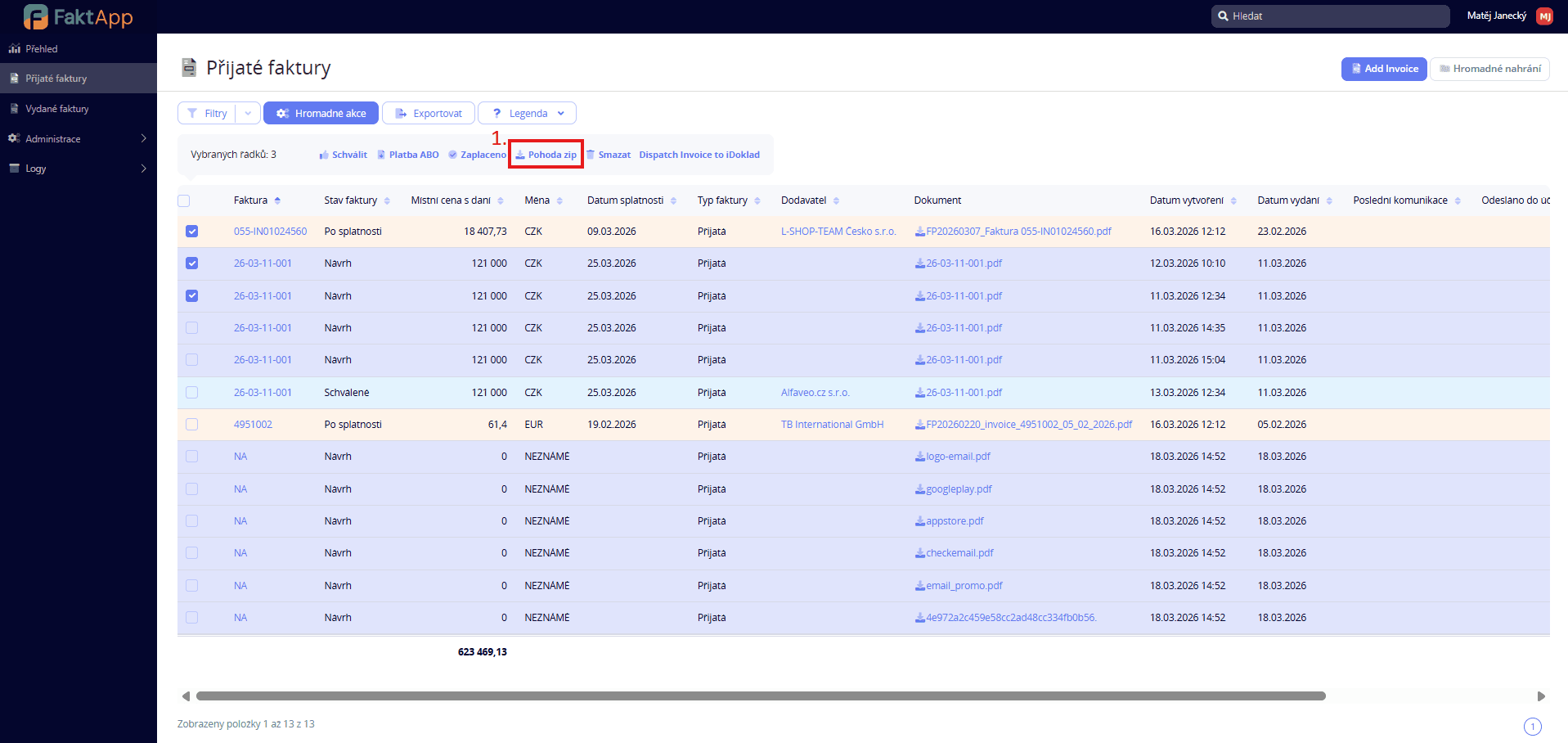
Bulk download as ZIP archive
For exporting multiple invoices at once, use the bulk Pohoda XML download function. The system generates an XML file for each selected invoice and packages them into a ZIP archive. Files are named in the format pohoda_{sequence}_{invoice_number}.xml. After download, the accounting dispatch date is recorded for each invoice. The ZIP archive is automatically downloaded to your browser.